
When working with BMW CAS4 immobilizer systems, programming keys directly via the OBD port can sometimes lead to module corruption. The safer approach is to read the chip data on the bench. Although it requires a few more steps, it protects the CAS module from potential damage. This guide walks you through the entire process on a 2009 BMW 730Li using the KEYDIY KD-X4 key programmer and the KD-EPA adapter.
What Is the KEYDIY KD-EPA Adapter?
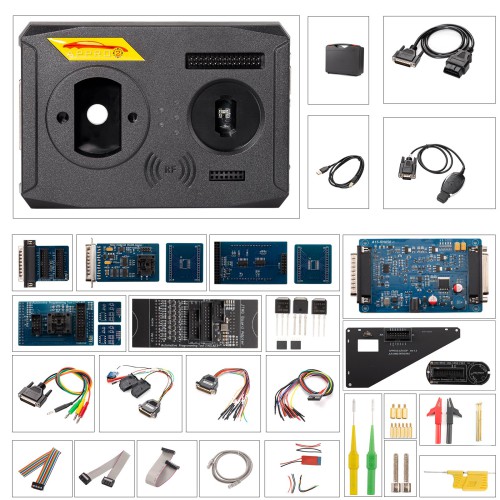
The KD-EPA is an expansion programming adapter designed for advanced chip memory reading and module decryption. It allows you to safely bypass OBD limitations when working with complex immobilizer systems. Future vehicle support is added through firmware updates, making it a versatile tool for professional locksmiths and automotive technicians.
Supported Hardware & Decryption Functions
- BMW CAS Decryption: Requires 2000 K-coins for activation. Enables bench reading for BMW CAS modules (including CAS4/CAS4+ 1L15Y).
- Porsche 49 BCM Decryption: Requires 2000 K-coins for activation. Allows direct memory extraction from Porsche 49 BCM modules.
- Firmware Upgrades: The KD-EPA supports firmware updates to expand functionality for additional vehicle modules over time.

Step-by-Step: Adding a Key to BMW CAS4 (2009 730Li)
Tools Required
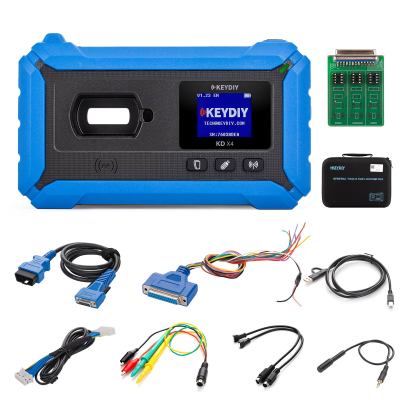
- KEYDIY KD-X4 5-in-1 key programmer
- KEYDIY KD-EPA Adapter
- KEYDIY KD FGB23 Key (blank)
- OTG cable & soldering equipment
Note: Ensure you have 2000 K-coins available in your account to activate the BMW CAS decryption function.

Step 1: Removing the CAS4 Module
Start by disconnecting the negative battery cable to avoid any electrical issues. Remove the lower trim panel beneath the steering wheel, unscrew the CAS4 module, disconnect the three wiring harness connectors, and carefully place the module on your workbench.


Step 2: Soldering and Reading EEPROM Data
- Open the KD-X4 app and navigate to: Immo Programming > KD-X4/KD prog mini > Read file > IMMO > BMW > CAS4-1L15Y [Backup Read] > EEPROM.

- Follow the app's pinout diagram, solder the required wires to the CAS4 board, and connect the KD-EPA adapter via the OTG cable.

- Tap Read to save the EEPROM file. Also, save the D-FLASH/Preflash backup file for extra safety.


- All saved files are stored automatically in the Local File folder, organized by today's date.

Step 3: Reinstalling the CAS4 Module
After reading, desolder the connections, place the CAS4 module back into its original position, reconnect the three plugs, secure the screws, reattach the lower trim panel, and reconnect the negative battery cable.

Step 4: Programming the New Key via OBD
- Connect the KEYDIY KD-X4 to the vehicle's OBD port.
- Navigate to Immo Programming > immo Programming > BMW > Select by Type > CAS4/CAS4+ > Start execution > 1L15Y Type.

- Verify that the displayed VIN matches your vehicle, then select Load from Local File and choose the EEPROM dump you saved earlier.


- Select an empty key slot (e.g., Key 3) to program the new remote.

- Place the new KEYDIY KD FGB key into the KD-X4 antenna slot, select KD-FGB remote from the list, and click Generate Common Dealer Keys.


Step 5: Testing the New Key
Hold the newly programmed key against the key symbol located on the right side of the steering column. Press the engine start button to start the vehicle, turn it off, and then test all remote control functions (lock, unlock, trunk) to confirm successful programming.

Recent Comment
Max Sherman
Sep 1, 2026Great guide – clear and practical. I appreciate the emphasis on bench reading over OBD programming for CAS4 modules. Too many people skip this and end up with corrupted data. The step-by-step photos and tool list make it easy to follow, even for someone who's done this a few times. The KD-EPA adapter seems like a solid investment, especially with the firmware upgrade path. One suggestion: it might be helpful to include a quick troubleshooting section for common soldering issues or read errors. Overall, a very useful write-up for anyone working on BMW immobilizer systems.